
Tag: ms word
-
AutoSave is Killing Me
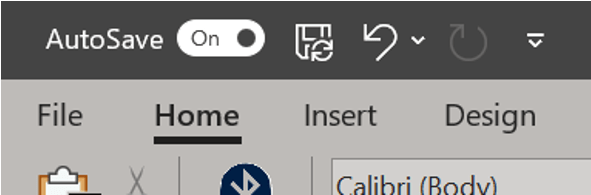
Sometimes our file is big and saving often means waiting a lot and often. Sometimes, we forget about saving and think we’ve lost all our work but AutoSave rescued us. By default, Word automatically saves your document at set intervals as part of the AutoSave feature. Not sure if you have AutoSave on? Look to…
-
Program Your Own AutoCorrect
Did you know you can customize autocorrect? Don’t like what it changes? Want to add what it changes? You can remove, replace, or add words that the program updates by going to the File tab and choosing Options. This will launch the Word Options menu. On the left click Proofing, then click the button for…
-
Quick case change

Ever have a sentence or phrase that you need in all caps? Or maybe it’s a title and you need each word capitalized? Rather than retype, select the section you want to change. On the Home ribbon in the Font group, click the drop-down menu for the Change Case menu. Depending on the option, this…
-
Footnote Separator Errors

Sometimes when dealing with footnotes, the separator (that line above the footnote text) isn’t landing quite where you want it. Maybe it’s giving you too much space. You know that no amount of changing the margins is fixing this problem because it’s not related to the margins at all. This is an easy fix despite…
-
Hidden Pictures

So you read about hidden text and now you’re feeling all advanced and power and thinking, but could that work with pictures? Yes. If you want to hide an image, insert the image first. The image must have In line with text wrapping applied to it. This will not work with other wrapping options. Now…
-
Ruler

Did you know there’s a ruler in Word? It’s a simple tool that aids in formatting your document from assisting in the alignment of text, tabs, tables, graphics, and even margins. If the ruler doesn’t automatically appear when you open a document, go to the View ribbon. From the middle of the ribbon, you’ll see…
-
Hidden Messages
Did you know your document can include hidden text? Like invisible ink, the message only appears if you know the secret. Sounds silly, immature, possibly get you fired for screwing this up, right? Perhaps, but let’s indulge. Why even have this option? Isn’t the point of a Word document to communicate everything in the file?…
 Ryn Nicol