
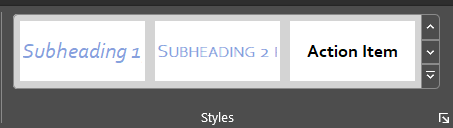
This week let’s talk about Styles. What are they, why are they important, how and when are they helpful, and where do you find them?
What is a Style?
A style is a rule we create in Word based on a set of formatting characteristics, such as font name, size, color, paragraph justification, and even borders and/or shading. Styles allow us to apply multiple format rules to a paragraph in one click instead of trying to remember each characteristic for every paragraph.
Why Do We Use Them?
Typical reasons to use styles are consistency of format, decreasing the time it takes to format a document, and ease of indexing particularly as it relates to creating a table of contents.
How and When Are Styles Useful?
As mentioned Styles include formatting rules for individual words/characters or paragraphs. When formatting a document Styles make it easy to apply uniform looks to your paragraphs in bulk usually with just one or two clicks. Decide you hate the look of your bulleted lists? If a style is applied to those lists in your document you can change all of them at once rather than changing each list individually. Wanna update the font type, color, etc.? Super easy with Styles.
Other benefits to styles, when Word auto-generates a table of contents it uses the built-in heading styles. Word uses these styles to create the Document Map (Ctrl+F to open the Navigation Pane and click on the Headings tab to view the Document Map), which is a convenient feature for moving through long documents.
Where Do You Find Styles?
The Style Gallery, found on the Home ribbon, allows you to glance at preformatted options for individual words (character styles) or entire paragraphs (paragraph styles) and are commonly referred to as “quick styles.” If you initiate a document, File > New, the body text of your document will automatically format with the Normal style. Though you may edit these styles and remove them from the Style Gallery you may not delete the Normal set.

Tomorrow I’ll discuss the different types of Styles found in Word.
 Ryn Nicol